


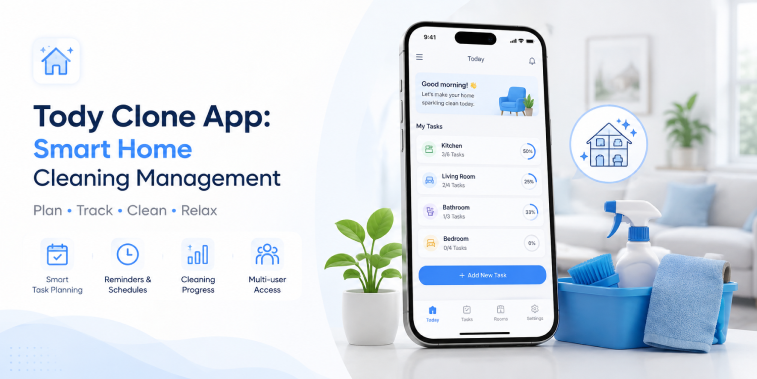
Introduction
Keeping a home clean is not only about completing individual chores. It also involves planning tasks, remembering when different areas need attention, dividing responsibilities, and maintaining a consistent cleaning routine.
A Tody Clone App can provide a digital solution for organizing these activities through cleaning schedules, task management, reminders, progress tracking, and household organization.
Instead of relying on handwritten lists or remembering every cleaning task, users can manage their household cleaning routines through a centralized mobile application.
A smart cleaning management platform can allow users to create rooms, add cleaning tasks, set task frequency, monitor progress, and receive reminders. Advanced versions can also use AI-assisted recommendations to help users organize cleaning routines according to their preferences and household requirements.
In 2026, smart home management applications can become more useful by combining personalization, automation, analytics, and intelligent task recommendations.
This guide explains what a Tody Clone App is, how it works, its core features, AI opportunities, business models, technology requirements, and how businesses can develop a smart home cleaning management platform.
What Is a Tody Clone App?
A Tody Clone App is a customizable cleaning management application inspired by the concept of organizing household cleaning tasks digitally.
The application can help users:
- Create rooms
- Add cleaning tasks
- Set task frequencies
- Track cleaning progress
- Receive reminders
- Prioritize chores
- Monitor household routines
- Manage cleaning schedules
The platform can be customized with a business’s own branding, interface, features, subscription plans, notifications, and other requirements.
Unlike a traditional home cleaning marketplace, a cleaning management app focuses primarily on helping users organize and manage their own household cleaning routines.
This distinction is important.
A home cleaning service marketplace connects customers with professional cleaners, while a cleaning management application helps users plan and complete household cleaning tasks themselves.
How Does a Smart Home Cleaning Management App Work?
The basic concept is straightforward.
Users create a household profile and organize their home into different areas.
For example:
Home → Rooms → Cleaning Tasks → Frequency → Schedule → Reminders → Progress
A user might create rooms such as:
- Kitchen
- Bedroom
- Bathroom
- Living room
- Dining room
- Home office
They can then add cleaning activities to each room.
For example:
Kitchen
- Clean countertops
- Mop floor
- Clean appliances
- Wipe cabinets
Bathroom
- Clean sink
- Scrub shower
- Clean toilet
- Mop floor
The application can use the selected frequency and previous activity to help users maintain a regular cleaning routine.
Why Build a Smart Cleaning Management App in 2026?
Increasing Interest in Digital Home Organization
People use mobile applications for calendars, shopping lists, fitness, finances, and household organization.
Cleaning management can fit naturally into this broader digital lifestyle.
Better Routine Management
Users may have difficulty remembering which tasks were completed and when certain chores need to be repeated.
A digital system can centralize this information.
Personalized Cleaning Plans
Different homes require different cleaning schedules.
A smart application can allow users to create routines based on:
- Home size
- Number of rooms
- Household members
- Pets
- Lifestyle
- Personal preferences
Progress Visibility
Visual progress indicators can make household tasks easier to understand and manage.
Smart Automation
Automated reminders can reduce the need for users to manually remember every cleaning activity.
Core Components of a Tody Clone App
A complete cleaning management platform can include several core components.
User Application
The main application allows users to create and manage their household cleaning routines.
Household Management
Users can create homes, rooms, tasks, and cleaning schedules.
Task Management System
The task system organizes chores based on frequency, priority, and completion history.
Notification System
Reminders can notify users about upcoming or overdue cleaning tasks.
Analytics
Users can view cleaning activity and progress over time.
Admin Dashboard
For businesses operating a commercial application, an administrative dashboard can manage users, subscriptions, content, notifications, and analytics.
Key Features of a Tody Clone App
User Registration and Profile
Users can create accounts using supported registration methods.
Profile management can include:
- Name
- Preferences
- Household information
- Notification settings
- Subscription information
Users should have appropriate control over their account and data.
Home and Room Management
Users can create their household structure inside the application.
For example:
Home
→ Kitchen
→ Bedroom
→ Bathroom
→ Living Room
→ Office
Each room can have its own cleaning tasks and schedule.
This makes it easier to organize chores according to physical areas.
Cleaning Task Management
Users can create individual cleaning tasks.
Each task can contain:
- Task name
- Room
- Frequency
- Priority
- Notes
- Last completed date
- Next suggested date
Users can mark tasks as completed when they finish them.
Cleaning Frequency
Different tasks need different schedules.
The application can allow users to configure frequencies such as:
- Daily
- Weekly
- Bi-weekly
- Monthly
- Custom intervals
For example, a user may choose to clean a kitchen surface frequently while scheduling a less frequent deep-cleaning task.
The system should provide flexible options rather than assuming every household follows the same routine.
Cleaning Reminders
Reminders can help users remember upcoming tasks.
Notifications can include:
- Task reminders
- Overdue tasks
- Daily cleaning suggestions
- Weekly routine reminders
- Progress notifications
Users should be able to customize notification preferences so the application does not become overwhelming.
Task Prioritization
Not every cleaning task has the same importance.
A smart cleaning application can allow users to prioritize tasks according to their preferences.
For example:
High Priority
- Kitchen cleaning
- Bathroom cleaning
Medium Priority
- Dusting
- Vacuuming
Low Priority
- Organizing storage areas
Priority settings can help users decide what to complete first when they have limited time.
Smart Cleaning Dashboard
A centralized dashboard can show users an overview of their cleaning routine.
The dashboard can display:
- Today’s tasks
- Upcoming tasks
- Overdue tasks
- Completed tasks
- Cleaning progress
- Room status
A visual interface can help users understand their current cleaning workload quickly.
Cleaning Progress Tracking
Progress tracking can make the application more useful over time.
Users can monitor:
- Completed tasks
- Pending tasks
- Cleaning frequency
- Room progress
- Weekly activity
- Monthly activity
Progress data can help users understand their household routines and identify areas that may need more attention.
Cleaning History
A cleaning history feature can record when tasks were completed.
Users can review previous activity for individual rooms or tasks.
For example:
Bathroom Deep Cleaning
Last completed: Previous scheduled date
Next recommended task: Based on selected frequency
This can reduce the need for users to remember cleaning dates manually.
Custom Cleaning Routines
Every household has different needs.
A customizable routine system can allow users to create their own cleaning plans.
Users can define:
- Tasks
- Rooms
- Frequency
- Priorities
- Reminders
- Notes
This flexibility can make the application useful for different household types.
Household Member Collaboration
A smart cleaning application can support shared household management.
Users can potentially invite family members or roommates to participate in cleaning routines.
Features may include:
- Shared household
- Task assignment
- Shared progress
- Individual responsibilities
- Completion updates
This can make the application useful for households where multiple people share cleaning responsibilities.
Cleaning Task Assignment
For shared homes, tasks can be assigned to different household members.
For example:
Person A
- Kitchen cleaning
- Dishwashing
Person B
- Bathroom cleaning
- Vacuuming
Person C
- Dusting
- Bedroom cleaning
The application can track assigned and completed tasks.
AI-Powered Cleaning Management
AI can add intelligent functionality to a home cleaning management application in 2026.
The focus should be on practical assistance rather than adding AI simply for marketing.
AI Cleaning Schedule Recommendations
AI can analyze user-defined tasks and preferences to suggest a practical cleaning schedule.
The system can consider:
- Task frequency
- Room types
- Household preferences
- Previous completion patterns
- Available time
Users should remain in control of the final schedule.
AI Task Prioritization
AI can help identify which tasks may be most appropriate to complete first based on the user’s selected priorities and schedule.
For example, if several tasks are pending, the system could organize them into a manageable routine.
Personalized Cleaning Suggestions
The application can provide personalized suggestions based on the user’s cleaning history and household configuration.
For example, it might suggest reviewing tasks that have not been completed recently.
These recommendations should remain general household organization suggestions rather than medical or safety-critical advice.
AI Cleaning Assistant
An AI-powered assistant can help users interact with their cleaning schedule.
Users could ask questions such as:
“What cleaning tasks should I complete today?”
The assistant could respond using the user’s configured tasks and schedule.
Smart Notifications
Instead of sending identical reminders to every user, the application can personalize notifications based on configured schedules.
Examples include:
- Upcoming task reminders
- Missed task reminders
- Weekly planning prompts
- Routine completion updates
Users should have control over notification frequency.
Cleaning Analytics and Insights
Analytics can help users understand their cleaning habits.
The platform can provide:
- Weekly completion rates
- Monthly progress
- Most frequently completed tasks
- Pending tasks
- Room-level activity
- Cleaning routine trends
Businesses can also use aggregated platform analytics to understand product engagement, subject to applicable privacy requirements.
Gamification and Motivation
Cleaning can sometimes feel repetitive.
Gamification can make routine management more engaging.
Potential features include:
- Completion streaks
- Achievement badges
- Progress milestones
- Weekly goals
- Personal challenges
The goal should be to encourage consistent routines without making the experience stressful.
Subscription and Business Models
A cleaning management application can use different monetization strategies.
Preemium Model
Users can access basic cleaning management features for free while advanced features require a subscription.
For example:
Free
- Basic rooms
- Basic tasks
- Basic reminders
Premium
- Unlimited rooms
- Advanced scheduling
- AI recommendations
- Detailed analytics
- Household collaboration
Monthly Subscription
Users can pay a recurring monthly fee for premium functionality.
Annual Subscription
An annual plan can provide access to premium features for a longer period.
Family Plan
A family-oriented subscription can allow multiple household members to use shared cleaning functionality.
One-Time Premium Upgrade
Depending on the business strategy, businesses can offer selected premium functionality as a one-time purchase.
The appropriate model depends on the target audience and product positioning.
Benefits of a Smart Home Cleaning Management App
For Individuals
Users can organize cleaning tasks without relying on memory or paper lists.
Benefits can include:
- Better organization
- Clear schedules
- Reminders
- Progress tracking
- Personalized routines
For Families
Shared task management can help distribute household responsibilities.
For Roommates
Task assignments can make shared cleaning responsibilities easier to coordinate.
For Businesses
A digital cleaning management platform can create opportunities through subscriptions, premium functionality, and household-focused digital services.
Technology and Third-Party Integrations
A smart cleaning management application may require several technologies and integrations.
Cloud Storage
Cloud infrastructure can synchronize user data across supported devices.
Push Notifications
Notification services can deliver cleaning reminders.
Analytics
Analytics can provide insights into application usage and feature engagement.
Authentication
Secure authentication can protect user accounts.
Calendar Integration
Calendar functionality can help users incorporate cleaning tasks into their broader schedules where supported.
AI Services
AI APIs or models can support recommendations, natural-language interactions, and intelligent task organization.
Integrations should be selected according to product requirements, cost, scalability, privacy, and security considerations.
Security and Privacy
A cleaning management app may contain household information, schedules, account details, and other personal data.
Security measures can include:
- Secure authentication
- Access controls
- Data encryption
- Account management
- Secure cloud infrastructure
- Appropriate data retention policies
Businesses should follow applicable privacy and data-protection laws.
Users should also be provided with clear information about what data the application collects and how it is used.
How to Choose the Right Tody Clone App Solution
Businesses planning to launch a smart cleaning management platform should evaluate several areas.
Customization
The platform should support custom branding, features, subscription plans, and user workflows.
Cleaning Management
Core task, room, schedule, and reminder functionality should be flexible.
AI Capabilities
AI features should solve practical user problems, such as schedule recommendations and intelligent task organization.
Scalability
The platform should support growth in users, households, and application activity.
User Experience
The interface should make adding and completing tasks simple.
Analytics
Analytics can help businesses understand user engagement and improve the application.
Security
The platform should have appropriate security and privacy controls.
Future of Smart Home Cleaning Management in 2026
Smart cleaning applications can evolve beyond simple task lists.
Future developments may include:
- More personalized schedules
- AI-assisted planning
- Smart-home integrations
- Voice-based task management
- Advanced household collaboration
- Personalized analytics
- Automated reminders
- Connected home devices
Integration with smart-home ecosystems could eventually allow cleaning applications to work alongside connected devices and household systems where technically supported.
However, the core objective should remain simple: help users manage household cleaning more effectively.
Conclusion
A Tody Clone App can provide a digital solution for organizing and managing household cleaning routines.
Unlike a professional cleaning marketplace, a smart cleaning management application focuses on helping users plan their own household chores through rooms, tasks, schedules, reminders, priorities, and progress tracking.
Core features such as cleaning task management, room organization, recurring schedules, reminders, cleaning history, household collaboration, and analytics can create a useful everyday application.
AI can add another layer of convenience in 2026 through intelligent schedule recommendations, task prioritization, personalized suggestions, and an AI cleaning assistant.
Businesses can monetize the platform through freemium access, subscriptions, family plans, or premium features.
At the same time, technology should remain simple and user-focused. A cleaning management app does not need unnecessary complexity to provide value. Its primary purpose is to help users understand what needs to be cleaned, when it should be cleaned, and how their routine is progressing.
With a clean user experience, flexible task management, responsible AI, strong privacy practices, and useful personalization, a Tody Clone App can become a practical smart home cleaning management platform for modern households.
Frequently Asked Questions (FAQs)
1. What is a Tody Clone App?
A Tody Clone App is a customizable home cleaning management application that helps users organize rooms, cleaning tasks, schedules, reminders, priorities, and progress.
2. How does a smart home cleaning management app work?
Users create their home and rooms, add cleaning tasks, set frequencies, manage schedules, receive reminders, and track completed activities through the application.
3. Can AI be added to a Tody Clone App?
Yes. AI can support schedule recommendations, task prioritization, personalized cleaning suggestions, and natural-language interaction with the user’s configured cleaning tasks.
4. Can multiple household members use the app?
Yes. A customized platform can support shared households, task assignments, individual responsibilities, and shared cleaning progress.
5. How can a cleaning management app make money?
Common options include freemium plans, monthly or annual subscriptions, family plans, and premium features. The best model depends on the target audience and product strategy.

Parth Kulkarni
Managing Director
Parth Kulkarni is the Managing Director with strong expertise in IT and on-demand app solutions, focused on empowering startups and enterprises with scalable digital products. His strategic leadership and business insight drive innovation, ensuring consistent client success and long-term growth.
